Monday, January 29, 2007

Necessity is the mother of all inventions

Who ever said it, couldn't have been more right. I find myself building utilities and applications everytime I don't find the right one :) .. During the past few days, I built a similar utility plugin and I thought I might as well share it with the rest of the world.

A little background... I work on a myriad set of applications and technologies, and this requires me to keep doing a lot of activities on different applications parallely. So off-late I have been working on providing a JSF component that pulls in a user's presence information from a backend RTC server. In this case the backend happens to be Microsoft's Live Communication Server. As you might have guessed, I have a .NET component that is doing all the talking with the LCS instance and this component exposes its features as a set of WebServices which are then consumed by the Java layer and published to the application via a JSF component. No points for anyone guessing that this can be a mess to handle all alone :-p

Everytime I need to perform some quick and dirty work, Netbeans is the IDE of choice. One day I was trying out something on similar lines, I needed to import only a subset of the Java classes into a project. And I knew that the IDE did not present me a feature where I could pick and choose. The only option I had was to copy the files over manually outside the IDE and then delete those that I didn't require. That can be quite painful at times! I dearly wished I had an option where I could look at the files being imported in a tree structure, where I could just (un)select the files I wanted.... So I built myself one of those things :-D ... Here is a screenshot of the module in action..


As a part of my work, I ran into a hard-to-trace, intermittent bug that would cause the .NET layer to crash once in a while. One rather good thing that I did do was use Log4Net's logger within the entire .NET code. So I whipped out my IDE of choice, built the test-bed and began the debugging. Everything was fine and going smooth, except that I had to switch between two applications to keep monitoring the output. That is when I though... "How I wish I had a module that could tail this file and show me the data within the IDE itself!". I took a measure of the expected effort, realized it wasn't much, went ahead and built myself exactly what I wanted. Check it out in action....


Like what you see? Get it here.

Thats all for now, later!

Saturday, January 20, 2007

Java6: GroupLayout and a small gotcha


The new layout manager, GroupLayout, which is part of the JavaSE 6 bundle is great and coupled with Netbeans' Matisse component, makes a killer combination. Today I would like to talk about an issue that I ran into and hopefully would be able to help others running into the same issue.

Anyways, if you try hand-coding this layout for your components, there is a rather subtle thing to remember. In Java 5, if you wanted to add a component to a container like JPanel, you would do something like:

....
JPanel jp = new JPanel();
JButton button = new JButton(...);
jp.getContentPane().add(button);
....


The key point to notice is that you would explicitly get hold of the content pane and then add the component to it. Now with Java 6, the good old ways of adding a component directly to the parent are back (which internally ensures that the component is added to the content pane), i.e., the same example above could be simplified as:

jp.add(button);

All this fine and nice. Now when using GroupLayout, the code might look as follows (in Java 5):

GroupLayout layout = new GroupLayout(jp.getContentPane());
jp.getContentPane().setLayout(layout);
... // add the component to the layout

Since I was working with Java 6, I decided to use the simplified notation and did the following:

GroupLayout layout = new GroupLayout(jp);
jp..setLayout(layout);
... // add the component to the layout

And was I in for a shock when I ran the code !!! I kept seeing the following stack trace on my screen :-O

Exception in thread "AWT-EventQueue-0" java.lang.IllegalArgumentException:
GroupLayout can only be used with one Container at a time
at javax.swing.GroupLayout.checkParent(GroupLayout.java:1095)
at javax.swing.GroupLayout.invalidateLayout(GroupLayout.java:987)
......

It took me a while (which involved going through the source-code of GroupLayout) to figure out that the problem was actually with the way I am initializing the damn GroupLayout instance! The layout instance considers that it is being applied to the container ( JPanel in our case) whereas, the setLayout() method delegates the call to the content pane. And GroupLayout does a check to see that the host and owner are the same, if not, it throws a rather undecipherable exception like the one above. The key to getting it run was just simply to pass the content pane to the constructor of the GroupLayout instance.

GroupLayout layout = new GroupLayout(jp.getContentPane());
jp..setLayout(layout);
... // add the component to the layout

This experiment sure was good learning, but it would have been great if the implementation of GroupLayout threw a more meaningful exception stating the obvious rather than leaving us to figure out the obscure bits!

Thats all for now.

Thursday, April 06, 2006

Getting your ZeroG installer to work on your latest and greatest Linux distro

Certain versions of the ZeroG installers have a serious issue when installing software on the Linux desktops. You start seeing a variety of errors like

"/bin/ls: error while loading shared libraries: librt.so.1: cannot open shared object file: No such file or directory"

... and many others, while you can very clearly see that the library files are present on the file system.

I face the same issue while installing Oracle Calendar desktop client on my FC 5 Linux distro. When i started googling for the errors encountered, i started to see a lot of rather half-answered posts which did not work for me. Sufficient enough to piss me off, i started debugging the installer by setting the debug param to true.

>LAX_DEBUG=1 sh cal_linux

This gave me some leads and i finally figured that there was some kind of work around being applied because the installer kept thinking that the JVM being used had a version less than 1.4, which was inturn caused by the fact that the installer was setting the LD_ASSUME_KERNEL variable to 2.2.5 ...

The version information was pulled of from a set of variables called v_major, v_minor, etc.. Fix these values and you are good to go :)

>v_minor=4 sh cal_linux

voila!! the installation goes through smoothly :)

If you would like to further customize the installation by specifying the JDK to be used, then you could achieve the same by the following command:

>v_minor=5 sh cal_linux LAX_VM /usr/java/jdk1.5.0_06/bin/java

Hope that helps you folks out there.

Saturday, April 01, 2006

Connecting your Nokia 2112 with your Fedora Core 5

Here is a quick and dirty hack for connecting your Nokia 2112 CDMA phone to your linux box as an internet modem.

My hardware / software details:
* Fedora Core 5
* Nokia 2112 CDMA phone
* CA-42 cable.

Upon connecting your phone the usual response in the messages log is:

drivers/usb/class/cdc-acm.c: This device cannot do calls on its own. It is no modem.

None the less, register it as a modem.


Now go ahead and create a new internet connection based on this modem. Specify all the connection information (username, password, dial in number, etc.)

Now the last step :)
Open up your /etc/wvdial.conf file. In here you need to get rid of the +FCLASS option. Just remove this word from the init parameters, and that is it.

Now you should be able to connect to your internet :)

Have fun!!

p.s.: At times the wvdial.conf file keeps getting overriden. You will notice this everytime you get an error code of 8. If you get this error code, then just repeat the last step of removing the +FCLASS statement.

Saturday, June 04, 2005

Jumpstarting your JPDK portlets with DBPreferenceStore

JPDK Portlets are easy and fun to create. All you need is a neat idea, and a feasible solution to portletize it. Not all is fun though. There are a few caveats, which may not be visible right at the beginning. To know what exactly I am talking about, consider the following case study.


Rogue is a very innovative developer. One fine day, he gets a brilliant idea to portletize a very popular application. He publishes his portlet, and gets a very wide appreciation. The portlet is deployed on a major production site, which has thousands of employees using and customizing it, to suit their needs. The customer comes to Rogue with a very desired enhancement, and Rogue implements it and provides the new version to the customer.

But, Rogue had designed the portlet to use FilePreferenceStore for storing the user preferences. The customer, unaware about this detail, goes ahead and re-deploys the provider on his production system, and boom..... all the user customizations have been erased!!

Now, the customer, rather frantic, pulls the archived version, searches the web and identifies that he needs to copy the customizations folder back to the new deployment. Things finally work, and the customer realizes his folly, and learns his lesson the hard way.


Though the above case study is fictitious, it is a very common scenario that happens with people who are not well versed with the JPDK framework. The above scenario could be avoided if only the developer (Rogue here) had implemented the portlet solution to utilize database based preference store.

I definitely agree that it is easier to use the file system based preference store, as there are no additional configurations to perform when deploying the provider, but a little additional effort can go a long way. Using DBPreferenceStore for storing user preferences translates to the following:

  • User preferences are independent of the provider deployment
  • Easy upgrade / migration path – new portlet version, new container, different m/c, etc.
  • Technically, you could support high-availability for these portlets, by deploying them on multiple containers, and sharing the sessions across the containers.

, And other benefits that I have missed out here.

Setting up a DBPreferenceStore is as simple as deploying an .ear file. All you need to do is:

  • Install the JPDK preference store schema on a database.
  • Create a datasource within the application server container which points to the above created schema.
  • Make a reference to this datasource in your portlet’s provider.xml file.
Sample Example:
1. Provider.xml file configured to use FilePreferenceStore

<preferenceStore class="oracle.portal.provider.v2.preference.FilePreferenceStore">
  <name>EasyAccessPrefStore</name>
  <useHashing>true</useHashing>
</preferenceStore>


2. Provider.xml file configured to use DBPreferenceStore

<preferenceStore class="oracle.portal.provider.v2.preference.DBPreferenceStore">
  <name>EasyAccessPrefStore</name>
  <connection>jdbc/dbprefstore2</connection>
</preferenceStore>


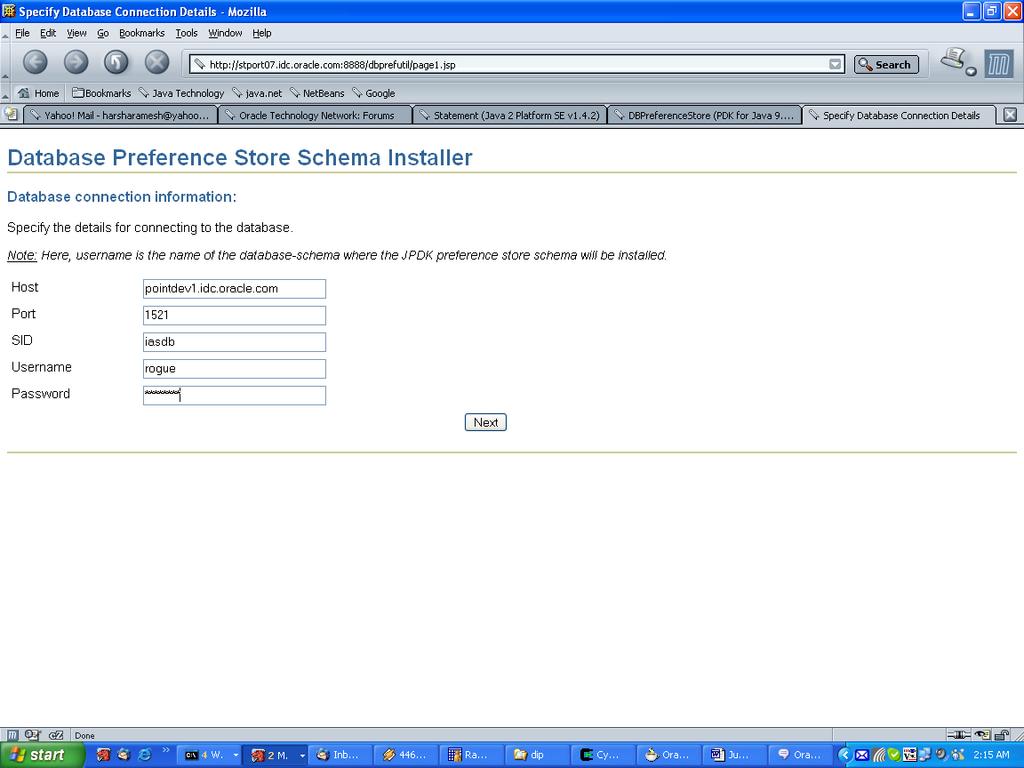
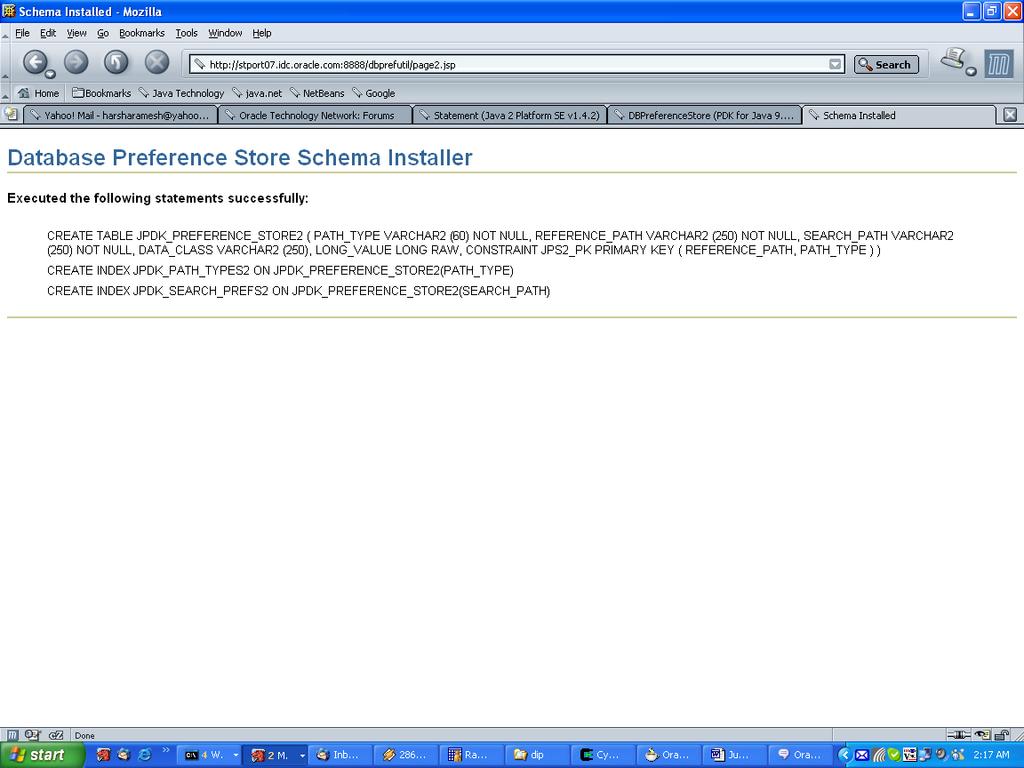
I am among the few people who are skeptical about working on the database, and prefer to work as much as possible via the web-based interfaces. Hence, I came up with a utility web-application (DbPrefStoreUtil), which installs the database schema required for DBPreferenceStore, on a remote database. This application is available on Knowledge Exchange under my personal folder (Search for contributor: harsha.ramesh). I have also included a detailed document on how one can setup a datasource via the OracleAS Enterprise Manager or the OC4J Admin Console on the standalone OC4J.

So the next time you decide to implement a portlet solution, try and see if you could provide a solution based on DBPreferenceStore.

Screenshots: